
VG MTK Tool 2024
VG MTK Tool 2024 | No Need Python | New Update | Format Fran Recovery | Erase FRP/Micloud
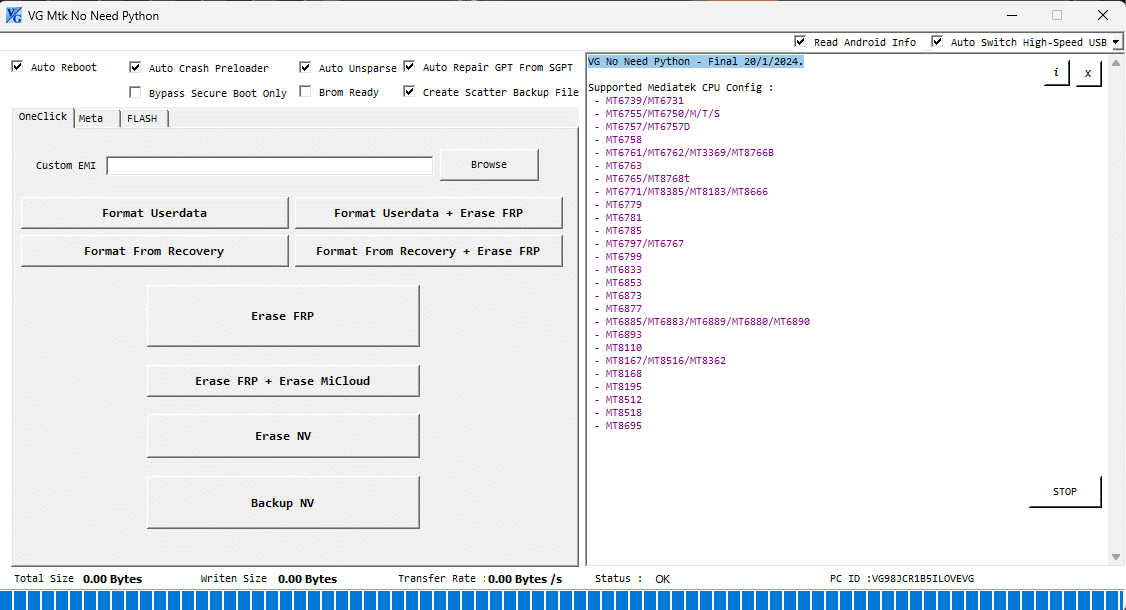
Features OF VG MTK Tool 2024
If you are looking for a tool that can flash and unlock Mediatek devices without using Python scripts, then you should check out the VG MTK No Need Python Tool 2024 New Update. This tool is developed by the VG Team, a group of talented developers who have created many useful tools for Android devices. The VG MTK No Need Python Tool 2024 New Update is a Windows-based application that can perform various tasks on Mediatek devices, such as
Custom EMI: This feature allows you to change the EMI (External Memory Interface) settings of your device, which can improve the performance and stability of your device.
Format Userdata: This feature allows you to erase all the user data on your device, which can help you fix issues like bootloop, virus infection, or data corruption.
Format Fran Recovery: This feature allows you to erase the FRAN (Factory Reset All Network) partition on your device, which can help you bypass the FRP (Factory Reset Protection) lock on your device.
Format Userdata + Erase FRP: This feature allows you to erase both the user data and the FRP lock on your device, which can help you reset your device to factory settings and remove the Google account verification.
Format Fran Recovery + Erase FRP: This feature allows you to erase both the FRAN partition and the FRP lock on your device, which can help you bypass the FRP lock and restore the network settings on your device.
Erase FRP: This feature allows you to erase only the FRP lock on your device, which can help you bypass the Google account verification on your device.
The VG MTK No Need Python Tool 2024 New Update also supports the Meta mode, which is a special mode that allows you to communicate with your device without booting into the normal mode. The Meta mode can be used for:
Boot Meta: This feature allows you to boot your device into the Meta mode, which can help you fix issues like dead boot, hard brick, or stuck at logo.
Factory Reset Meta: This feature allows you to perform a factory reset on your device in the Meta mode, which can help you fix issues like pattern lock, pin lock, or password lock.
Erase FRP + Erase MiC10ud: This feature allows you to erase both the FRP lock and the MiC10ud (Mi Cloud) lock on your device, which can help you bypass the Xiaomi account verification on your device.
Erase NV: This feature allows you to erase the NV (Non-Volatile) partition on your device, which can help you fix issues like IMEI (International Mobile Equipment Identity) null, baseband unknown, or network signal problem.
Backup NV: This feature allows you to backup the NV partition on your device, which can help you restore the IMEI, baseband, and network signal on your device.
How To Use?
- First, you need to download the zip file from the below link
- Next, you can unzip all files at c: drive (important)
- Ensure you have disabled the antivirus before running the installation
- Next, open the folder and install the setup file with some basic instruction
- Run the "VG MTK Tool 2024"
- Next, you can install all drivers if you already installed skip this step
- Connect the phone and try to do any function
- Enjoy !!!
Download Links
Name: VG MTK Tool 2024
Size: 12MB