
.png)
VG Quick Unlocker is a simple and free Windows utility for fixing and repairing MTK (MediaTek), and Qualcomm-powered Android phones easily.
What is VG Quick Unlocker?
The VG Quick Unlocker enables you to Reset FRP, Format Factory, Safe format, repair IMEI, Flashing firmware, Unlock FRP, and reset screen pattern, password, pin lock on MediaTek MTK, and Qualcomm-based Android phones easily.
.png)
The latest v1.0 update comes with many new improved and universal functions, and added more additional models from Infinix, Itel, Realme, Nokia, Motorola, and Samsung.
Features:
Here is the list of quick features you can use to fix or repair any MediaTek, Qualcomm-powered Android phones easily.
MediaTek & Qualcomm
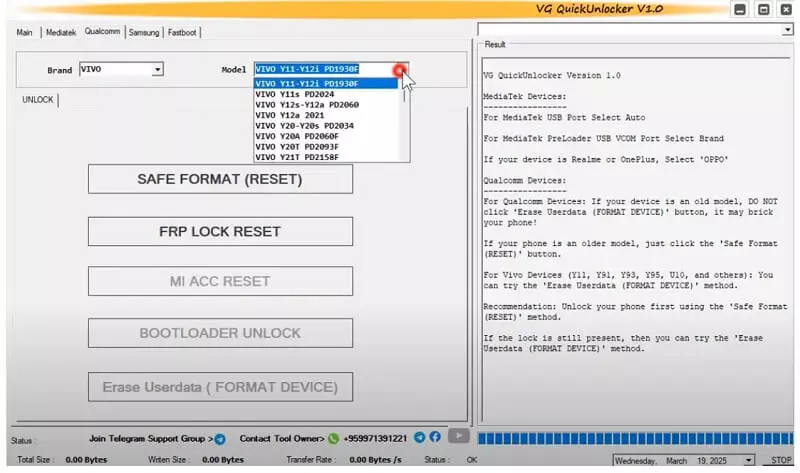
- Format userdata + FRP bypass
- Factory reset with FRP removal
- Remove FRP
- Erase Mi Cloud lock
- Unlock/Relock BL
- Read, write, erase functions
- Flash Mbn and scatter txt file.
Samsung
- Samsung MTP mode enable ADB.
- Download & recovery mode options
- Factory reset & FRP remove
- Reboot to (Download/Recovery)
Fastboot & ADB
- Qualcomm Fastboot to Reboot to EDL (9008) or normal mode
- Erase FB FRP lock
- FB Read info for Mi, Huawei, Honor, Vivo
.png)
Huawei & Honor
- Huawei, Honor Factory reset
- FRP unlocking using SN & key
Download Links
Download VG Quick Unlocker Tool V1.0 latest version along with all versions for your Windows computer to flash or unlock the Android phone easily for free.
File Information:
Tool Name: VG Quick Unlocker Tool V1.0.zip
Size: 60.43 MB
Type: Free
Join us on Telegram: t.me/seidali2Store
Download: MediafFire
How to use VG Quick Unlocker v1.0
The following step-by-step process will let you easily install the Tool on your Windows computer and also helps you to unlock your Android phones. So, follow below process completely.
Requirements
- Compatibility: Windows 7 / 8 / 10 / 11 (32-bit or 64-bit)
- Internet: Required for downloading files or checking updates
- Drivers: You’ll need MTK QCOM Driver, or SPD USB driver.
Steps 1: install the tool
- Download the VG Quick Unlock version 1.0 tool to your Computer.
.png)
- Extract the setup using Windows extractor, 7zip or WinRar.
- Run the tool with Administrator permission.
.png)
- Next, the installer wizard will opened.
.png)
- Click Install, agree to the terms, and complete the installation.
.png)
- Click Finish.
Steps 2: Configure & Use
.png)
- Run the tool from desktop shortcut.
.png)
- First, Go to model or device tab. Mediatek | Qualcomm | Samsung | Fastboot
- Next, Select the function you want to use.
.png)
- After that, check the log screen instructions & connect the phone according to it.
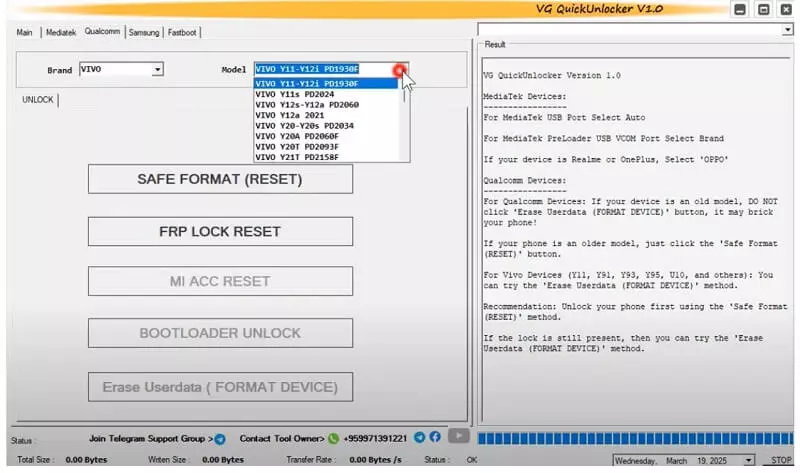
- Wait for job done.
- Disconnect & check the phone.
- That’s it.

.png)

.png)